

Why a Client Arrival Notification App Matters
- karl50784
- Jul 31
- 6 min read
A client arrives five minutes early while you are in the middle of a session. They hesitate in the hallway, unsure whether to knock. You hear the door, lose your train of thought, and glance toward the clock. The person sitting across from you notices.
This is a small moment, but in a therapy office, wellness practice, salon, or studio, small moments shape the experience. A client arrival notification app gives arriving clients a clear, quiet way to announce themselves without asking you to break your attention. They check in on an iPad. You receive a text or email. Your current appointment stays centered.
That is not about adding more office technology. It is about protecting the tone of your space.
The arrival interruption affects everyone
For appointment-based professionals without a full-time receptionist, arrivals can create an awkward gap in an otherwise thoughtful client journey. A client may stand outside a closed door wondering whether they are in the right place. They may knock during a sensitive conversation. Or they may wait in a lobby with no indication that anyone knows they are there.
Meanwhile, you are asked to make an impossible choice. Do you interrupt the person in front of you to greet the next client? Do you ask a current client to wait while you step out? Do you listen for the door between appointments and hope no one is left uncertain?
None of these choices means you are inattentive or unprofessional. They are simply the realities of running a small, client-centered practice. But they can make the day feel more fragmented than it needs to be.
The cost is not only time. For therapists and counselors, an unexpected knock can disrupt a vulnerable conversation. For an acupuncturist or physician, it can pull focus away from care. For a stylist, esthetician, or studio owner, it can make a client feel rushed just as they are settling in. The next client may also feel overlooked before their appointment even begins.
A better arrival process gives both people a little more ease.
What a client arrival notification app actually does
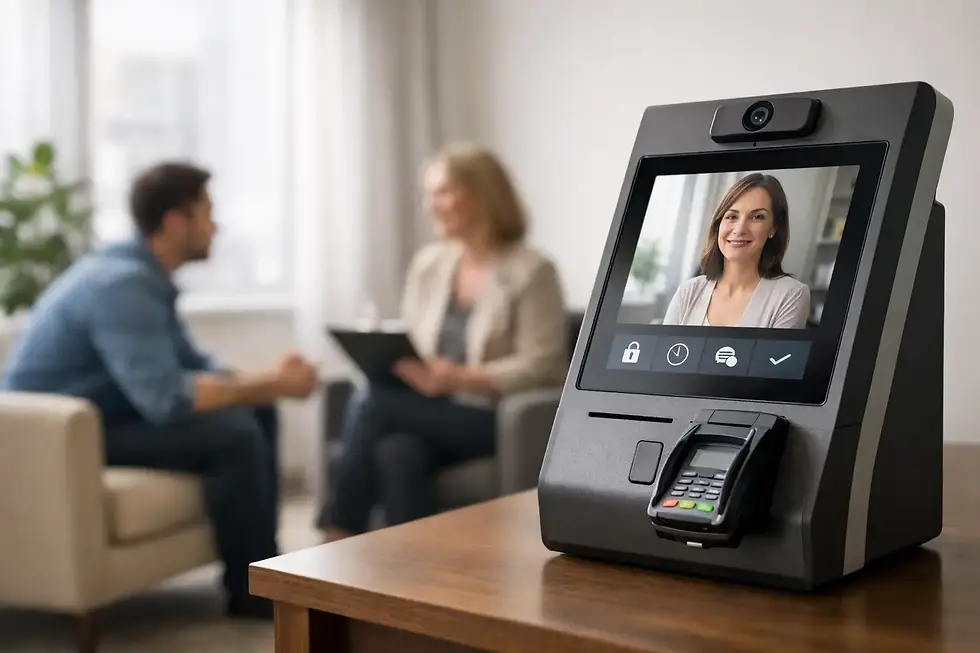
The idea is intentionally simple. A dedicated iPad in your entry or waiting area displays a clear check-in screen. When a client arrives, they enter their name or make their presence known. The app sends you a notification by text or email, so you know they are there without needing to monitor the lobby.
From the client's perspective, the process answers an immediate question: Has someone been notified that I am here? From your perspective, it removes the need to listen for footsteps, watch the door, or rely on clients to interrupt you.
The best tools do not turn this moment into a complicated intake process. They do not ask clients to create accounts, navigate a crowded kiosk, or fill out unnecessary forms at the door. Arrival is a small interaction. It should feel that way.
With Purple Couch, the workflow is built around three quiet steps: the client checks in on an iPad, you receive a text or email notification, and you continue giving your current client your full attention. When you are ready, you can greet the next person with confidence rather than surprise.
Why a quiet check-in supports better care
A notification may sound like a practical detail, but it changes the emotional rhythm of a practice.
Your current client keeps your attention
Focused attention is part of the service. Whether someone is discussing something personal, receiving treatment, or simply taking time for themselves, they should not feel that the next arrival has taken priority. A discreet notification lets you decide when to transition instead of reacting to a knock or an uncertain client at the door.
That boundary is especially meaningful in care settings. You can acknowledge an arrival without making the person in front of you feel like their session has been cut short.
The arriving client receives reassurance
Waiting is rarely the problem by itself. Uncertain waiting is. A client who has checked in knows their arrival has been communicated. They do not have to guess whether they should knock, call, or open another door.
This is useful for first-time clients, who may already feel a little nervous about entering an unfamiliar office. It is equally useful for regulars. Consistency creates trust. When the arrival process is clear each time, people know what to expect.
Privacy is easier to protect
In many practices, a front desk conversation can reveal more than necessary. A quiet iPad check-in reduces the need for clients to announce themselves in a shared hallway or explain why they are there within earshot of others.
For health and wellness providers, privacy is not just a nice touch. It is part of respectful care. A HIPAA-compliant check-in option can support that expectation while keeping the interaction simple for clients and staff.
When an iPad check-in makes the most sense
A client arrival notification app is particularly helpful when you are usually with someone and cannot regularly step away. Solo therapy practices, counseling offices, acupuncture clinics, massage and wellness spaces, independent medical offices, salons, and private studios often fit this pattern.
It can also work well for small teams sharing a suite. If multiple practitioners see clients in the same space, each person can receive their own arrival notifications rather than expecting one person to manage the door for everyone.
Still, it is not the right answer for every business. A busy, open retail reception area with staff always at the desk may not need a separate check-in workflow. A large medical facility with complex registration, insurance verification, and high visitor volume may need a broader system.
The value is strongest when the problem is presence: you need to know a client has arrived, but you do not need an enterprise visitor-management platform to do it.
What to look for before choosing an app
The right system should lower the mental load, not move it somewhere else. Before adding a check-in app, consider whether it handles the details that matter in a small practice.
First, setup should be short. If creating a basic arrival screen requires an implementation project, it is probably more system than you need. You should be able to place the iPad where clients naturally enter, choose how you want to be notified, and begin using it quickly.
Second, notifications need to reach you where you already are. Text messages are useful when you are moving between rooms or do not have your email open. Email can work well for practitioners who prefer to keep work communication in one place. Having both options lets you choose the rhythm that feels least intrusive.
Third, think about connectivity. Office Wi-Fi is common, but it is not always dependable. An iPad with cellular service can be a practical backup in offices where the internet is unreliable or the entry area has a weak signal.
Finally, look at the client experience from the doorway. Is the instruction obvious? Is the screen calm and uncluttered? Could a new client use it without being coached? If the answer is yes, the tool is doing its job.
A small change that can make the day feel lighter
Many practice owners assume arrival interruptions are simply part of working without a receptionist. They become accustomed to peeking toward the door, apologizing for a knock, or worrying that a client has been waiting too long.
But you do not need to hire a full-time front desk team to create a more polished welcome. A simple iPad-based check-in can cover the specific moment that causes the disruption, without adding complicated workflows or another set of tasks to manage.
It also gives you more control over transitions. You can finish a thought, complete a treatment step, or bring a conversation to a natural close before stepping out. The next client is not being ignored. They have checked in, and you know they are there.
Common questions about client arrival notifications
Will clients know how to use it?
They should. A good check-in screen is designed for a person who has never seen it before. Clear language and a simple prompt are usually all that is needed. The goal is not to make clients learn a new system. It is to give them an easy, respectful next step when they arrive.
What if I do not have reliable office Wi-Fi?
A cellular-enabled iPad can help keep check-in available when Wi-Fi is inconsistent. This is worth considering for shared buildings, older offices, or spaces where the router is far from the waiting area.
Do I need to be tech-savvy to set it up?
No. For a small practice, the best setup is one you can complete without an IT person or a long training session. If you can use an iPad and receive a text message, you should be able to manage the daily workflow.
Is this only for therapy practices?
No. The need is common anywhere one professional is giving focused attention to one client at a time. The details of the work may differ, but the arrival problem is familiar: someone new walks in while you are still fully engaged with someone else.
A calmer welcome does not require a larger office, more staff, or a complicated front desk. Sometimes it starts with a clear place to check in and the quiet assurance that you will know when someone is waiting.


Comments