

Email Notifications for Patient Arrivals That Protect Focus
- karl50784
- Jul 22
- 6 min read
A patient arrives five minutes early while you are in the middle of a session. They do not want to interrupt. You do not want them standing uncertainly in a hallway. Yet without a front desk, someone has to notice they are there. Email notifications for patient arrivals solve that quiet but meaningful gap without pulling your attention away from the person already in your care.
For a small practice, an arrival is not just an administrative event. It can change the tone of the waiting room, the hallway, and the session in progress. The right notification gives you awareness without requiring an interruption. Your patient can feel received, and you can stay present.
The real problem is not knowing who has arrived
Many solo practitioners and small offices manage arrivals through workarounds. A patient knocks softly. They text a personal number. They open the door and ask whether they should wait. Or the practitioner keeps half an eye on the clock and listens for footsteps between conversations.
None of these moments is dramatic, but they add up. A therapist may feel pulled out of a difficult conversation. An acupuncturist may need to leave a treatment room. A physician or wellness provider may worry that a new patient has been waiting too long without knowing what to do next.
The person waiting can feel uncertain, too. They may wonder whether they are in the right place, whether they should announce themselves, or whether their arrival has gone unnoticed. For patients who are already anxious, seeking sensitive care, or visiting for the first time, that uncertainty can shape their first impression of the practice.
A staffed reception desk can handle this, but it is not the right answer for every office. Hiring front-desk support is expensive, and many appointment-based practices do not need a person managing arrivals all day. What they need is a simple, respectful way to know someone is present.
How email notifications for patient arrivals work
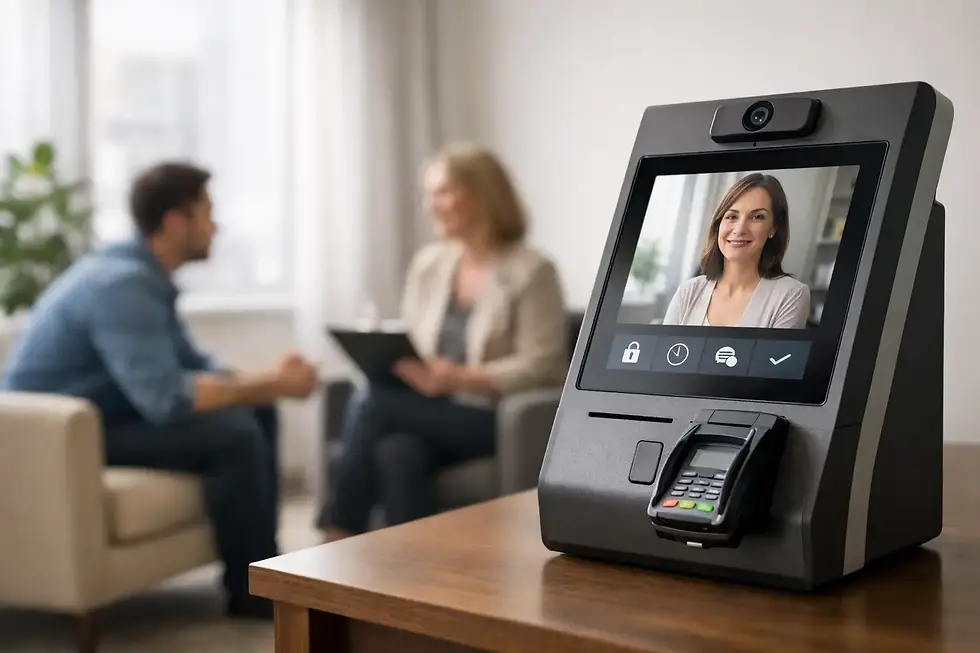
The most useful arrival workflow is intentionally small. A patient walks in, checks in on a dedicated iPad, and you receive an email notification that they have arrived. You can then continue the appointment in front of you without getting up, checking the waiting area, or asking a current patient to pause.
The notification is not meant to become another stream of administrative noise. It should answer one question clearly: is my next patient here?
For some practices, email is the preferred channel because it fits the tools they already use throughout the day. It can appear on a computer, tablet, smartwatch, or phone. A clinician who keeps their phone silenced during sessions may still see the notification at a natural transition. An office manager may monitor a shared inbox. A small team can decide who receives each alert based on how the practice operates.
Email is especially helpful when the goal is quiet awareness rather than an immediate demand for action. You know the patient has arrived. They know they have checked in. Neither person needs to create an awkward interruption.
Keep the notification purposeful and minimal
In a healthcare setting, privacy should shape the design of every arrival notification. The email should contain only the information needed to support the arrival process. More detail is not always more helpful, particularly when messages may appear on a lock screen, in a shared inbox, or on a device that travels outside the office.
Your practice should also consider where notifications are delivered and who can access them. Use secure accounts, strong passwords, appropriate device controls, and a workflow that aligns with your privacy policies. If protected health information is involved, confirm that the technology and processes you use support your HIPAA obligations.
This is not a reason to make the workflow complicated. It is a reason to be thoughtful. A patient arrival system should protect both privacy and presence.
Why email can be better than a knock at the door
A knock seems simple until you consider what it asks of everyone involved. The arriving patient has to decide whether it is acceptable to interrupt. The practitioner has to decide whether to respond immediately. The current patient may hear the interruption and feel the shift in attention.
An email notification changes the social pressure of that moment. The arriving patient has completed a clear next step. The practitioner has been informed discreetly. The current session remains intact.
That difference matters in spaces built on trust. In counseling, the room needs to feel private and contained. In a medical or wellness appointment, the patient in front of you deserves your full attention. In a salon or studio, the experience should feel personal rather than rushed by whoever walks through the door next.
There is a trade-off, of course. Email is not always the best choice when an immediate response is necessary. If your office has frequent walk-ins, a busy shared waiting room, or urgent clinical needs, a different process may be more appropriate. Some teams prefer text alerts for faster visibility. Others use email as a backup while a team member handles in-person arrivals.
For quiet, appointment-driven offices, though, email often provides the right level of awareness. It communicates presence without turning every arrival into an interruption.
A better arrival experience begins before the notification
The notification only works well when the check-in experience is obvious to the patient. Place the iPad where people naturally pause when they enter. Keep the screen simple. Use language that feels welcoming and direct, such as asking them to check in when they arrive.
First-time patients should not need instructions from another person to complete a basic arrival step. If they have to search for a sign, download an app, remember a password, or explain themselves to someone in the hallway, the system has created more friction than it removed.
A dedicated iPad is useful because it creates one consistent ritual: arrive, check in, wait comfortably. It also avoids putting patients in the position of using their own phones for a process that should feel easy and professional.
Purple Couch App is built around this kind of focused workflow: a client checks in on an iPad, the practitioner receives a text or email notification, and the session already underway can continue without disruption. The point is not to add another layer of office management. It is to make the arrival moment feel handled.
Set up notifications around your actual day
Before choosing email notifications for patient arrivals, think about the moments when you are most likely to need them. A solo therapist who meets with one person at a time has different needs than a wellness clinic with several practitioners sharing a lobby.
Start by deciding who should receive the email. In a solo practice, it may be only the practitioner. In a shared office, each provider may receive their own patient arrivals, or one person may monitor a shared inbox. The clearest setup is usually best. If everyone assumes someone else is watching, the notification loses its value.
Then consider the device you are most likely to notice between appointments. A desktop email alert may work well if you use a computer for notes. A tablet may be better if your work is mostly mobile. If you prefer not to look at email during sessions, set the expectation that you will review arrivals at your next natural break.
Finally, make the waiting experience clear. Patients should know where to sit and what happens next. You do not need a long explanation. A calm sign, comfortable seating, and a reliable check-in process can tell people that they are expected and that you will be with them soon.
Questions small practices often ask
Will patients know how to use an iPad check-in?
Most will, especially when the screen has one clear task. The goal is not to introduce new technology into their visit. It is to replace uncertainty with a simple, familiar action. For patients who need assistance, keep a backup process that feels equally respectful.
Do email notifications create more inbox clutter?
They can if every message is treated like general correspondence. Arrival notifications work best when they are easy to recognize and reserved for one purpose. Consider filters, notification settings, or a dedicated inbox so the signal stays clear.
What if Wi-Fi is unreliable?
A check-in system depends on connectivity, so this is worth planning for. Some iPads can use cellular service, which can provide reassurance in offices with inconsistent Wi-Fi. Your practice should also have a simple backup plan for the rare time an internet connection is unavailable.
Can this work without a receptionist?
That is where it is most valuable. It does not try to imitate a full front desk. It gives a small office a dependable way to acknowledge arrivals while keeping practitioners focused on care.
A patient should not have to wonder whether anyone knows they are there. And you should not have to choose between responding to the door and being fully present with the person who trusted you with this hour. A quiet notification can hold that transition with care, leaving the whole space feeling more settled.


Comments